Authoring pipelines
A pipeline is a fragment of Alloy config plus the matchers that decide which collectors receive it. Shepherd merges every enabled pipeline whose matchers select a given collector into the single config that collector is served. There are three ways in, and they all land in the same merge engine.
1. A wizard, if your job is a common one
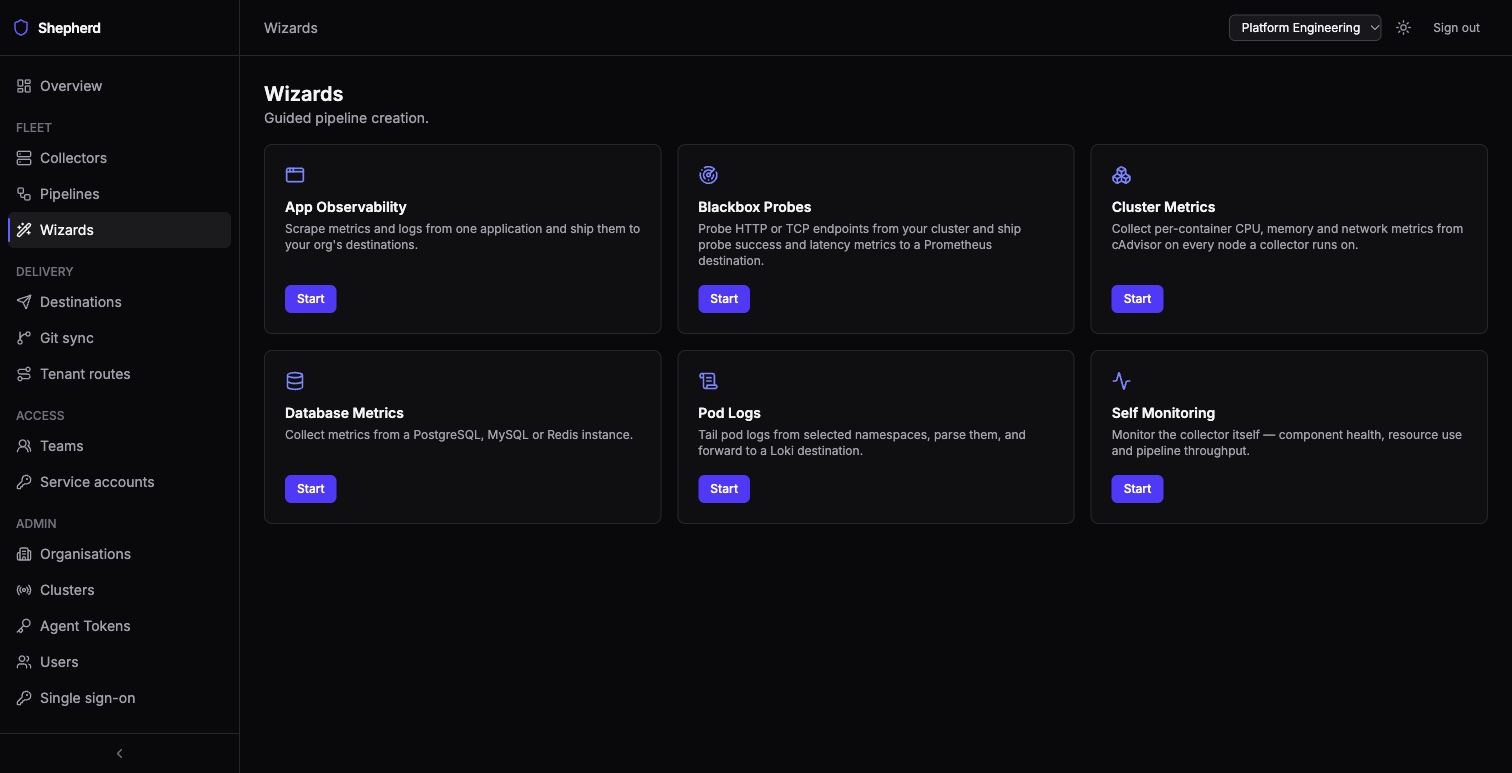
Six guided forms cover the jobs most fleets need. Answer the questions, preview the Alloy it generates, commit it as a pipeline. A wizard writes to one of your org’s destinations, and gets that destination’s URL and authentication. Each wizard suggests a free pipeline name, its Continue says which required fields are still missing, and the Review step previews which collectors the pipeline would reach and says why Create pipeline is disabled when it is.
Database Metrics never sees the database password. By default it asks for a
Kubernetes Secret’s namespace, name and key, and each collector reads the value itself
through remote.kubernetes.secret, the same way a destination’s
credentials are read. For PostgreSQL and MySQL the key (default dsn) holds the
whole connection string — postgresql://user:password@host:5432/db?sslmode=require,
or user:password@tcp(host:3306)/; for Redis the address is a plain answer and the
key (default password) holds the password — if the Secret lacks that key,
the collector still loads and connects to Redis without a password. The Secret must exist on
every cluster the pipeline matches, and the collector needs
get on Secrets in the Secret’s
namespace. If a collector cannot read the Secret, or the value is not a valid DSN, it
refuses its whole config, so create the Secret before you commit.
The Secret source is for collectors running in Kubernetes. A collector on a
host or VM cannot read a Kubernetes Secret and refuses its whole config, so keep the
pipeline’s matchers to Kubernetes clusters. For other collectors choose the
env credential source, which reads an environment variable that you must set on
those collectors yourself — Shepherd does not set it. A Redis without a password can
use none.
A wizard pipeline stays linked to its wizard. When a destination it ships to changes, Shepherd regenerates it. Saving a change to its text asks first (Save a hand edit?), because a hand edit stops that: the pipeline then reads Hand-edited in its header and Not following wizard in the pipelines list until you use Restore last wizard version, or you make it an ordinary pipeline with Detach from wizard. See when a destination change takes effect.
2. The visual builder, when you want to see the graph
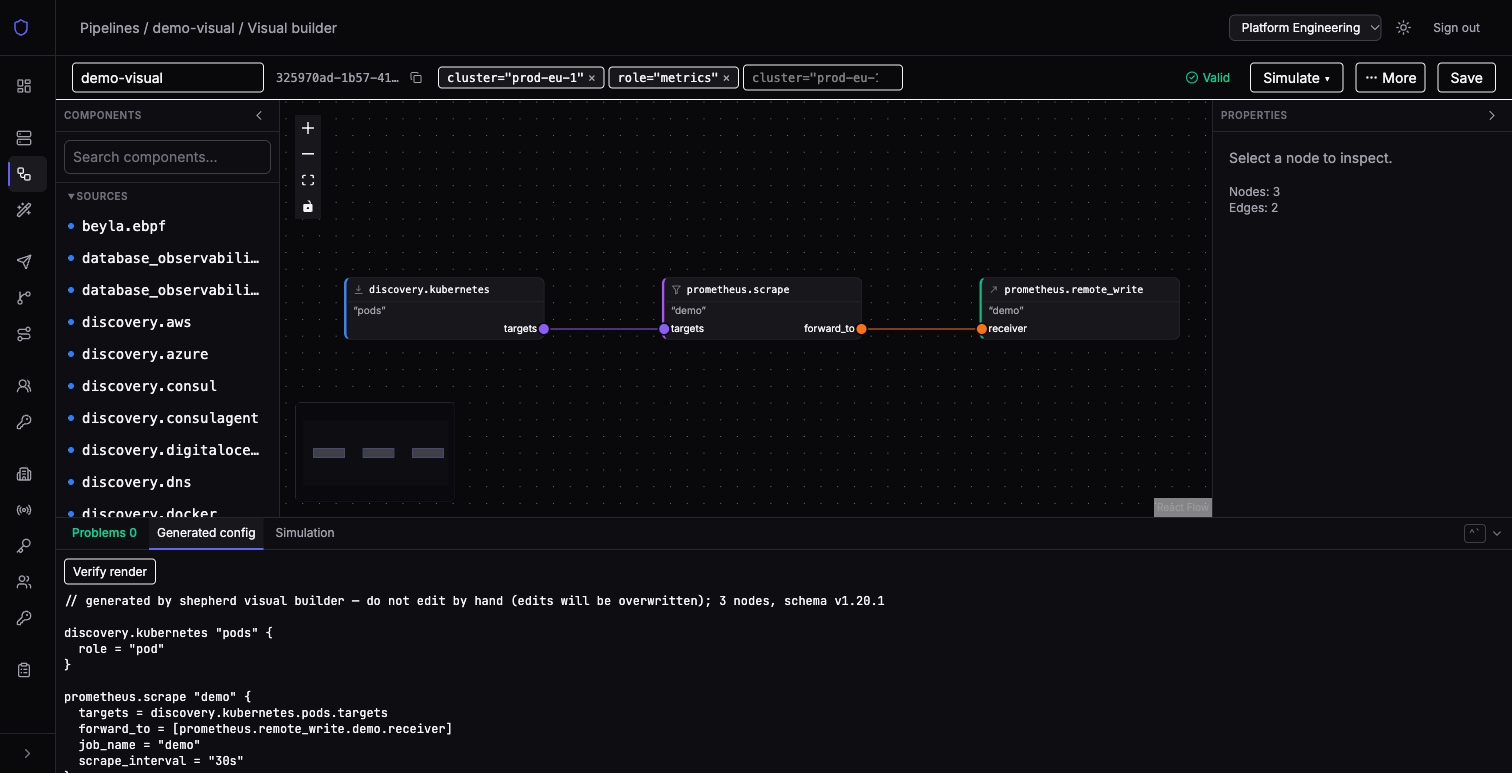
Drag components from the palette onto the canvas and wire their ports together. The Generated config tab shows the Alloy it produces as you work, and the validity chip in the toolbar goes red the moment the graph would not run — you cannot save a broken one.
Starting a new visual pipeline needs the org editor role. An existing one can be edited in the builder by anyone who may edit that pipeline, members of its owning team included; running it in the sandbox stays with org editors, and the builder says so on Simulate. Saving opens the pipeline’s page, the text editor, with a banner saying how to get back to the graph.
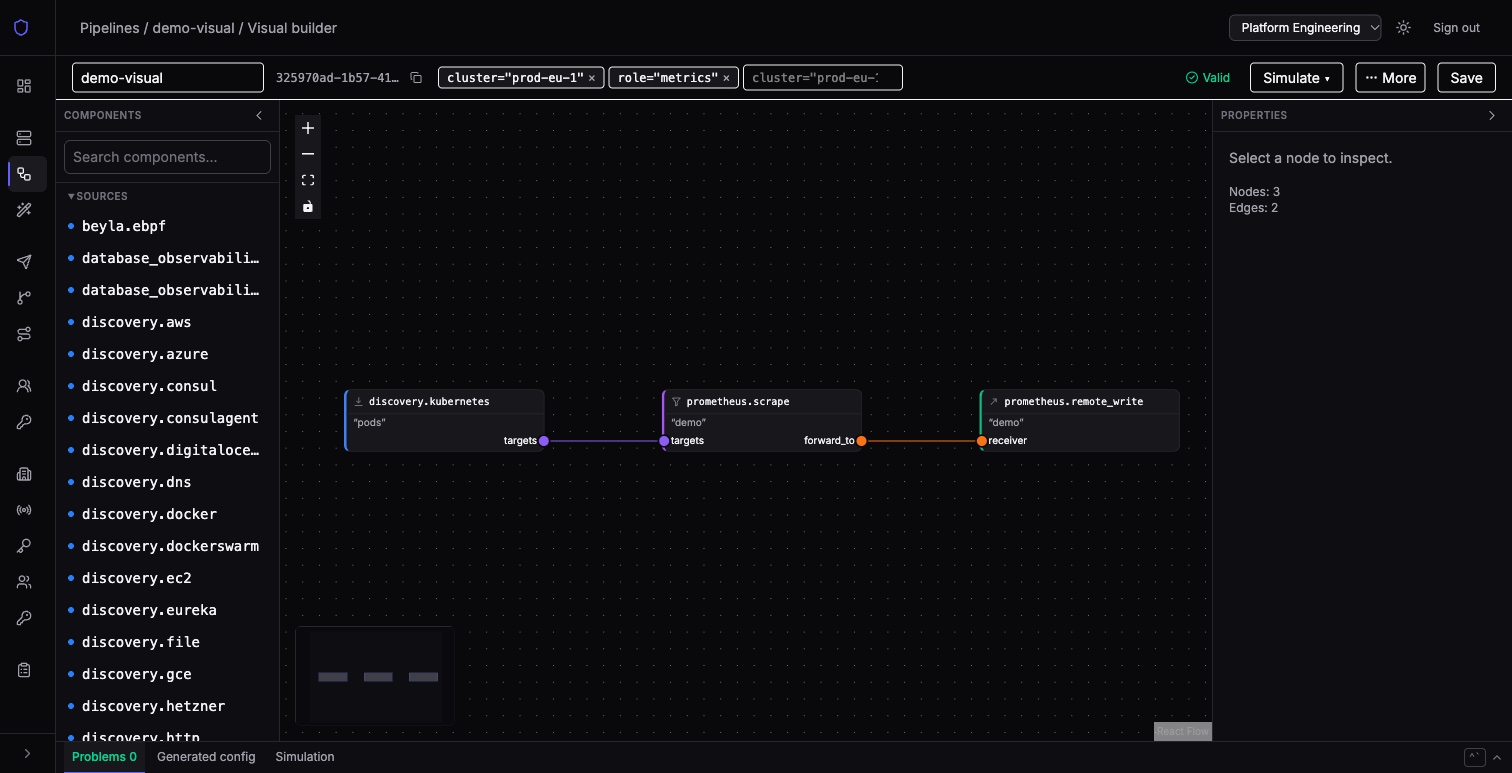
The graph below generates the config beside it. This is the same Alloy that will be merged and served — there is no separate translation step to be surprised by.
3. Raw Alloy, when you already know what you want
Paste the config. It goes through exactly the same gate as the other two.
4. Revisions and restore
Every save that changes something is a numbered revision; saving a pipeline unchanged adds none. The editor can show any past revision as a diff against the current text, so you can see exactly what changed and who changed it.
Restoring a revision does not rewrite history — it creates a new revision from the old one's contents, matchers and enabled state — so restoring a revision saved while the pipeline was disabled disables it, and the dialog says so — and runs it through the same validation gate as any other save. A git-managed pipeline can be restored too, but the next commit to the repository puts the repository’s text back.
A save from a page that loaded an older revision is refused instead of silently replacing someone else’s newer change. The dialog offers Reload, which shows the current version and discards your unsaved edits, and, in the text editor, Overwrite with my version.
5. View any pipeline as a graph
A pipeline written as text, by a wizard or by git sync — chart-generated Alloy from grafana/k8s-monitoring included — can be read as a graph: View as graph on its page, or the graph link beside its source in the pipelines list. (A visual pipeline opens in the builder instead.) The view is read-only: it changes nothing about how the pipeline is saved, rendered or served.
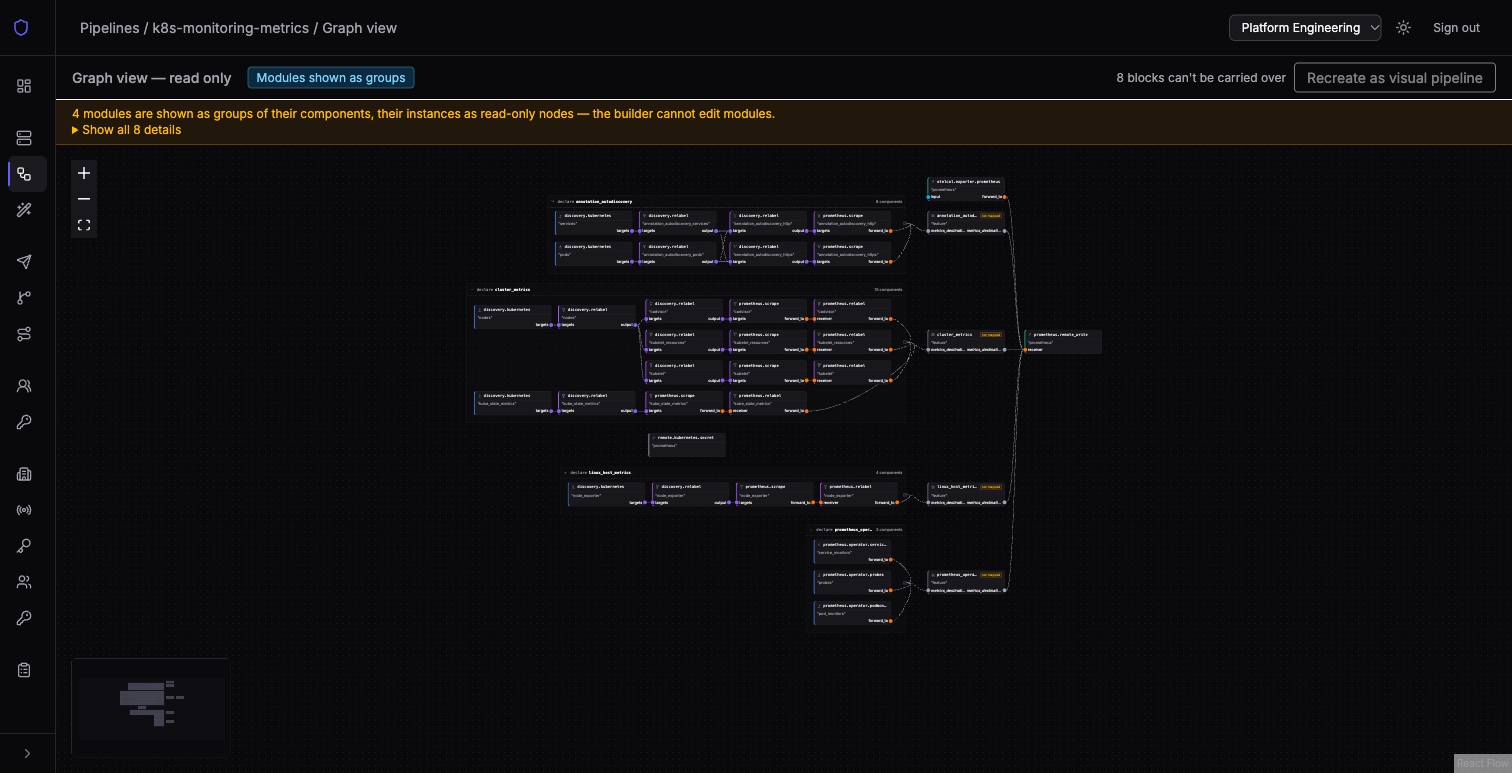
- Every wire is drawn, laid out left to right, including
forward_tolists and wires into or out of a block the view cannot map. - Modules are groups. Each
declareis a box holding its components, with its arguments and exports as ports wired to the module’s instance, so a component inside a module can be followed through to its destination. Nested modules open too. A box collapses and expands; one with more than 20 components starts collapsed. A module instance’s Show module brings its box into view. - A block the view cannot map is labelled not mapped and shows its source text; a module’s instance is a read-only node that links to its module’s group. A summary above the canvas says what was drawn how, with every detail behind Show all; the toolbar badge reads Modules shown as groups when nothing is genuinely unmapped, and Partial when something is.
- Selecting a node shows its settings and the secrets and other components it refers to.
Recreate as visual pipeline copies the graph into a new, separate visual draft; the conversion is lossy and the original is not changed. It needs the org editor role, and it is unavailable — saying how many blocks cannot be carried over — while the graph has a module or an unmapped block, since the builder has neither.
All three land in the same place. A wizard and the visual builder are editors, not separate systems — each produces Alloy config that goes through the same validation gate and the same merge engine as config you paste by hand. There is no translation step to be surprised by later.
Next: decide which collectors receive it.